STAY TUNED!
Subscribe to our newsletter and get the 600+ pages eBook Inside ARES:


Working with tables in your drawings and exporting them to Excel has never been so easy. Now, the tables in ARES Commander allow to include formulas, in the same way, that we would do it in programs like Excel. In this example, we are going to obtain the total of trees that we have in this project. We select the cell and choose the SUMMARY formula. Now, we indicate with two clicks the area that includes the values that we want to add. Observe that the formula has been written and press Create Note, and thus we obtain the result. Other functions could be to add a new column. We click on this cell, and right click to choose Insert, Column on the right. A column includes the unit prices of each tree. In the new column, we will obtain the total cost for each species, in addition to the total

The partnership with Onshape Onshape is renowned in the CAD industry for being the first and the most advanced cloud-based solution for 3D Product Design. In summer 2015, Onshape released Onshape Drawings and became the first Graebert partner releasing a solution based on ARES Kudo, Graebert’s Cloud-based technology. Onshape licensed ARES Kudo technology for Onshape Drawings Onshape Drawings allow Onshape users to document and annotate 2D views and sections of the 3D parametric models created in Onshape. The Onshape Drawings features are fully integrated into the Onshape environment and 2D views are refreshed after any change to the 3D models. This collaboration is now extending with the possibility to read and modify DWG files stored in Onshape with ARES Kudo. Graebert and Onshape extend their collaboration with DWG viewing and editing While designing their projects with Onshape, users may also need to upload to their Onshape Documents some DWG or

The professionals use MULTILEADER to create notes in the technical drawings. The same text is associated with several arrows that avoid having to repeat the text several times. ARES Commander offers the possibility of creating MULTILEADER. Let’s see how it works. In the ANNOTATION panel of the HOME tab, we can see the icon. But it is in the ANNOTATE tab, where more options will be found, within the MULTI-LEADERS section. For this, we use this icon. We indicate the first point and after indicating the second we write the text. Press FINISH. Now is when we add another LEADER, selecting the MULTILEADER, and indicating the position of the arrow. From here, we can edit the style we are using, or create new ones. For this, we have several parameters that will allow us to modify whether or not it has a note, a tolerance value, nothing, or a block. We

In this video, we highlight some usability improvements and reminders, and also some tricks using the mouse and keyboard. To begin, we will see how we can combine the SHIFT key and the arrows to move elements incrementally. Simply selecting an object and using the SHIFT key combination pressed with the arrows we can move it. We can use more than one item at a time. Through the options, the changes can increase the movement. Now, we simply select a group of elements and we can combine the SHIFT key and the arrows to move elements incrementaly. ARES Commander allows to COPY or MOVE elements to the active layer. For example, this is the active layer. And these elements belong to something else. When we use COPY or CUT, we can copy or move objects to the active layer. Let’s use CONTROL + C to copy elements. After pressing ENTER,

The ARES® Trinity of CAD Software combines the best of what each platform has to offer: Desktop, Mobile and Cloud are combined into a unique user experience generating high synergies across all your devices. ARES Commander for Windows®, macOS®, and Linux® computers remains our flagship product. You can keep using your laptops and/or computers for the heavy work as usual. You will find in ARES Commander all the features you need to create or modify DWG drawings, in 2D or 3D, in a productivity-driven environment. First of all, ARES Commander is fully installed on your computer. You can easily work offline, just like you have ever been used to. Secondly, our unique licensing allows the same user to work with his ARES Commander license on not only one, but multiple computers. At the office, at home or on the go your license follows you on any computer. Working on a

Do you want to learn more about technological trends brought forward by evolving technologies in the CAD industry in 2018? Editors of Cadalyst offer report the latest technology trends of 2018. Get a FREE guide with insights into the worlds of AEC and manufacturing by following this download link: https://info.cadalyst.com/1416-cadtrends2018 Jon Hirschtick, CEO of Onshape, believes that 2018 will be the “tipping point” for cloud-based CAD. “Different vendors have different interpretations of cloud CAD, but they all realize that most engineers will be moving the bulk of their work online over the next 5-10 years.” Cedric Desbordes, sales & marketing executive for Graebert, remarks “On the budget side, companies like to deploy such solutions to a larger audience to better share the technical knowledge, but in a cost-effective way. Ten years ago, the companies looking for alternatives to AutoCAD were mostly small- or medium-size firms. This is not true anymore, as

Amit Kumar writes about Split Dimension Tool in ARES Commander ‘The reasons I like this feature are: Improves readability of the drawing User can specify manual distance whenever required Entire drawing annotation can be handled Maintains dimension association with the entity User can refill the dimension gap by joining them Apparent intersections are also handled’ Read more on CADBlogbyAmit
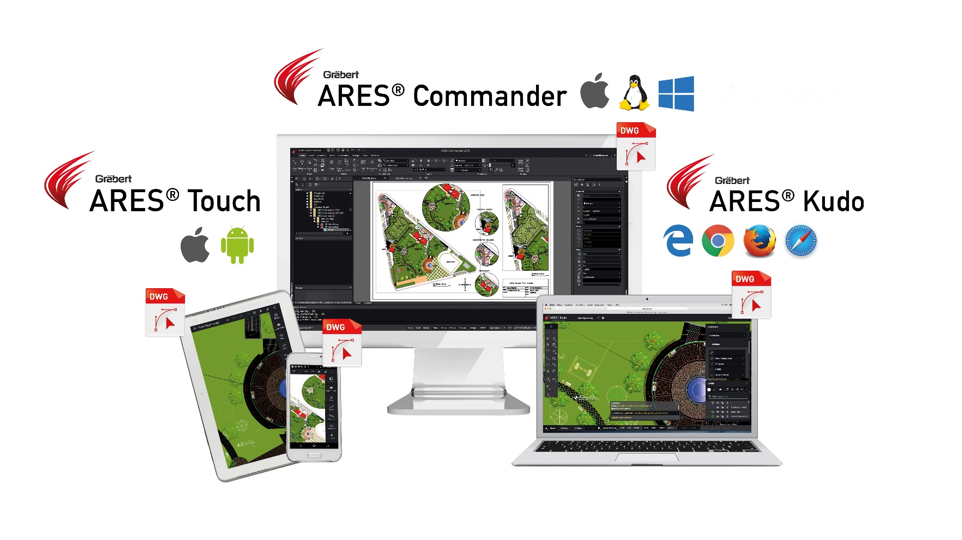
ARES Commander 2018 Much more than a cost-effective CAD Software for dwg editing, ARES Commander brings your productivity to the next level with smart productivity features and a unique concept: The Trinity of CAD™. The ARES Trinity of CAD Software combines the best of what each platform has to offer: Desktop, Mobile, and Cloud are combined into a unique user experience generating high synergies across all your devices. The highly flexible licensing of ARES Commander allows the same user to work from several computers under Windows®, MacOS® or Linux®. Each license includes also a 1-year renewable subscription for ARES Touch™ and ARES Kudo™. ARES Touch: The perfect companion for your mobile devices Subscribers of ARES Commander can enjoy ARES Touch on all their mobile devices at no additional cost. With more than 150 CAD features, ARES Touch is the most advanced Mobile CAD solution currently available for Android and iOS.
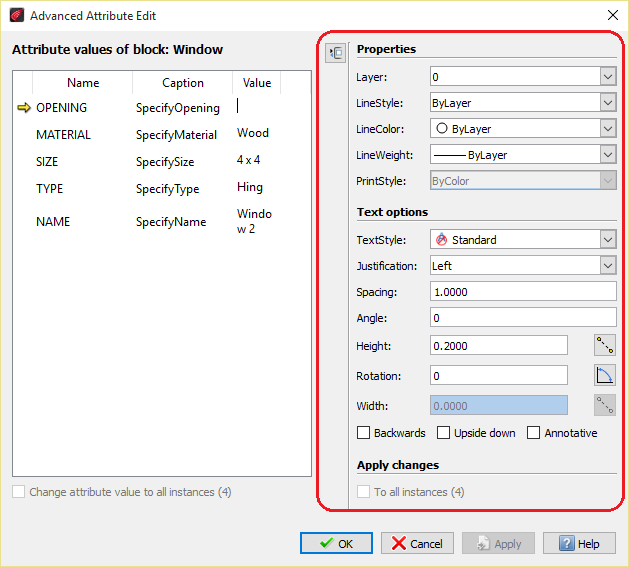
Amit Kumar writes about EditXAttribute in ARES Commander ‘The reasons I like this feature are: User can quickly change the attributes Information, as well as properties, can be changed Properties like Name, Height, Color and many other Editing the attributes are very easy We can update selected attributes with Value / Properties OR both. We can update all available attributes in a drawing.’ Read more on CADBlogbyAmit

Graebert Annual Meeting 2017 Key highlights of the Graebert Annual Meeting We had a lot of fun at the Annual Meeting and would like to share with you our recap video. In case you missed them you will also find below some interesting articles written after the event. A special thank you to our partners who joined us on stage for a keynote. Some articles by tech journalists following #Graebert17 ‘Regardless of how Autodesk perceives its competitors, it’s clear that Graebert has great confidence about the value of its products and its competitiveness going forward, and is eager for more visibility in the market.’ – Cyrena Respini-Irwin on Cadalyst Read more… ‘In this season when many CAD users are taking a close look at how they buy and manage their CAD technology, Graebert offers a unique technology proposition and a compelling value proposition.’ – Randall Newton, Consilia Vektor Read more…

Did you know that ARES Touch, our mobile DWG Viewer & Editor, is available for both Android and iOS?