
ARES Neo: Auto-Drawings for BIM Debut in Japan, Next Stop BIMWORLD Munich
- 19/10/2026
- Posted by: Graebert
- Category: FeaturedProduct News


DWG-compatible CAD has long been seen as a mature product, but generative AI, BIM and the cloud are changing what CAD is expected to do. At the ARES BIM Drawing Automation Project Seminar in Japan, Graebert showed how natural-language CAD operation, automatic checking and correction of drawings created from BIM models, cloud processing, and API and MCP integration are moving ARES from a tool people operate to a platform where humans and AI work together. The same approach, led by ARES Neo, comes to Europe next: Robert Gräbert, CTO of Graebert, will present “ARES Neo – Auto-Drawings for BIM” on the main stage at BIMWORLD Munich on November 24, 2026, at 5:35 pm.
2D CAD software has matured over several decades in terms of basic functions such as drawing lines and circles, adding dimensions, and managing layers. From the user’s perspective, these drawing functions are almost expected to be standard.
Up until now, the competitive landscape for DWG-compatible CAD software has primarily focused on compatibility with AutoCAD, price, command system, and processing speed. In other words, the fundamental process of designers operating CAD software in front of a computer hasn’t changed significantly.
However, with the spread of generative AI, BIM, and cloud computing, the very role expected of CAD has begun to change.
At the ARES BIM Drawing Automation Project Seminar, held on September 10, 2026, Graebert announced that its ARES DWG-compatible CAD software lineup is undergoing a major transformation through AI, BIM, and cloud computing. This transformation is enabling the automation and online creation of drawings, as well as API development for use with other software programs and generative AI, and MCP support.
とGraebert-Japan代表の江端陽二氏(左).JPG.png)
Cedric Desbordes (left), CGO of Graebert, and Yoji Ebata (right), Managing Director of Graebert Japan.
Cedric Desbordes, Chief Growth Officer (CGO) of Graebert, the German company that developed ARES, said, “AI is not just about pursuing new trends; it’s important that the results are reliable in practical applications, and that it can be widely deployed in practical settings, not just for a select few advanced users.”
It seems that DWG-compatible CAD software, which was thought to be mature, is entering another major evolutionary phase, spurred by AI.
This evolution is freeing CAD users from the tedious manual tasks associated with creating 2D drawings, such as the “clicking hell” and “copy-paste hell” caused by repetitive clicking and copy–pasting during manual work, and the “verification and correction hell” after BIM changes.
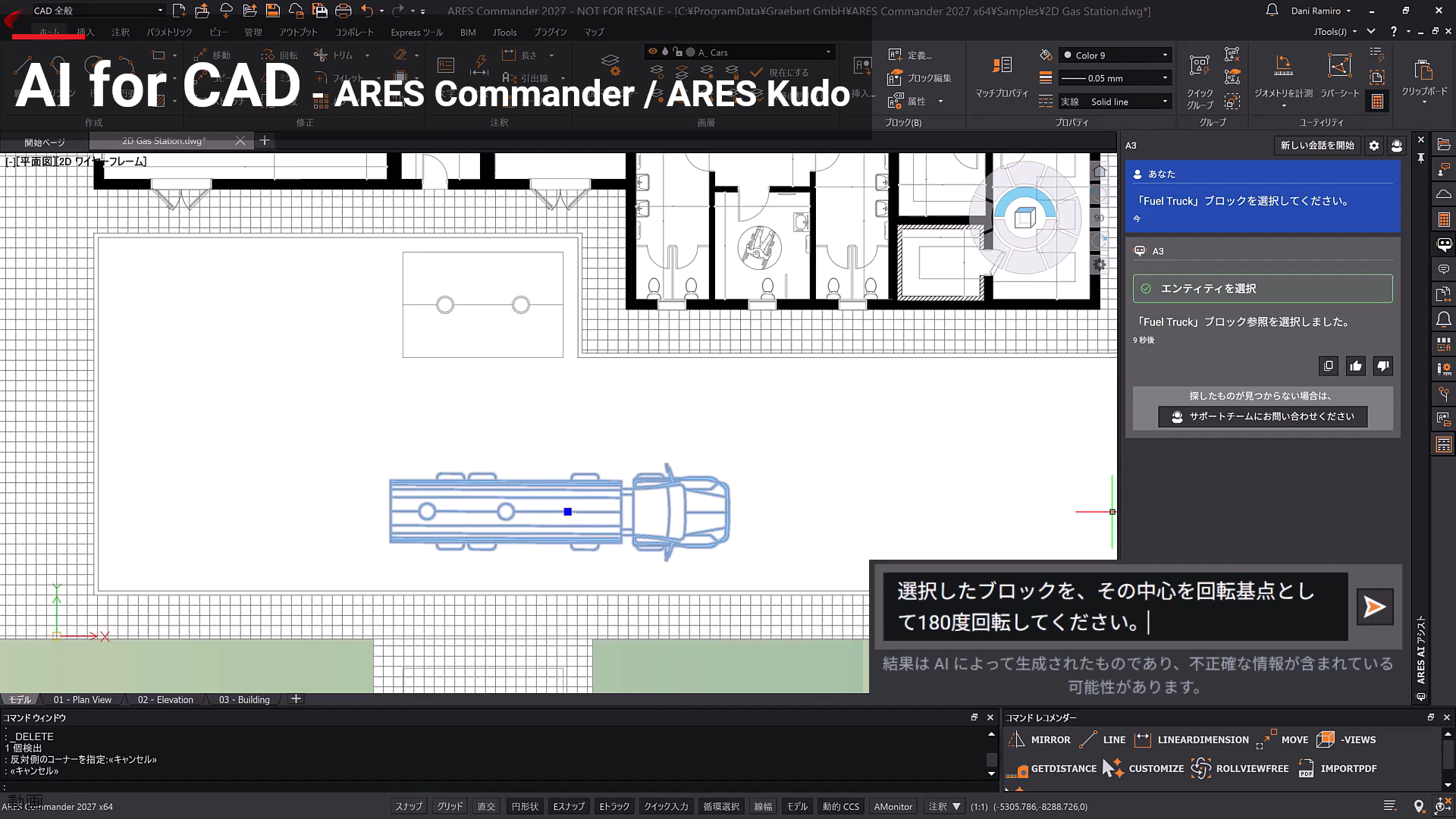
The ARES user interface incorporating AI. Unlike in conventional DWG-compatible CAD software, operations such as drawing and checking can be significantly automated in ARES.
AI Eliminates Overly Detailed CAD Operations
Traditional CAD work involved a series of small, repetitive operations: selecting a target object, creating a layer, moving it, changing its color, and rotating it, for example. While each instance might only take a short time, repeating this process many times a day becomes a significant burden.
Until now, the standard way to improve productivity and deal with this “clicking hell” as quickly as possible was to memorize commands and shortcuts, and to write macros and LISP programs.
ARES AI Assist (A3), the AI assistant included in ARES Commander (for desktop) and ARES Kudo (for cloud), is changing this way of thinking.
You can perform multiple steps at once, simply by giving A3 instructions in natural language, such as “move text and dimensions to a new annotation layer and make them blue.” This eliminates the tedious process of creating new layers, clicking to select each piece of text and dimension line, and specifying the color, as was necessary in the past. It’s also possible to select a group of blocks, rotate them 90 degrees, and then enlarge them to twice their original size, for example.
Yoji Ebata, Managing Director of Graebert Japan, explained, “Traditional automation functions automatically perform repetitive tasks that would be tedious for humans to do. On the other hand, A3 is an AI that interprets natural language instructions and assists with CAD operations.”
In other words, with A3, instead of humans having to think about “which commands to execute and in what order,” they tell the AI ”what they want to do,” Ebata explained. This represents a major shift from “CAD that you learn how to operate” to “CAD that you [tell] what you want to do.”
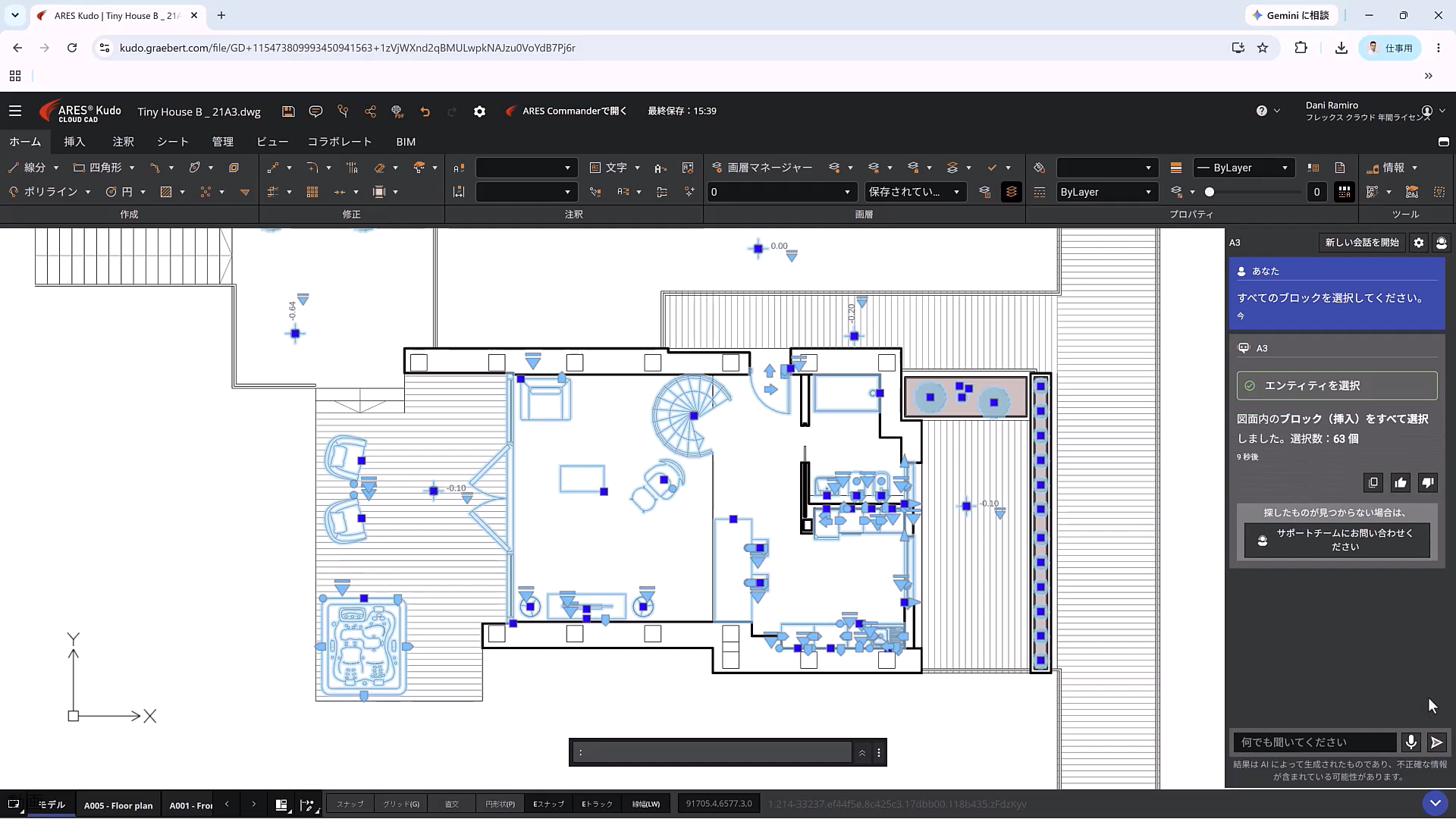
This screenshot shows a floor plan open in ARES, with A3 being manipulated. Efficient CAD operations can be performed using natural language.
AI Creates Drawings That are Easy for Humans to Understand
With the widespread adoption of BIM, it will be possible to automatically generate floor plans and cross-sections from 3D models. However, simply cutting a model horizontally and projecting the lines onto a 2D model will not result in a “drawing” that can be used in practical applications.
Drawings require dimensions, symbols, room names, notes, and other visual elements. The placement of these elements and what to emphasize greatly affects readability.
Drawings are not simply 2D displays of design data. They select the necessary design information, display it without overlapping, and lay it out in a way that is easy for humans to see and understand.
This is similar to the editing process for magazines and newspapers: An editor organizes information, prioritizes it, and optimally arranges text and photographs within the limited space to create a page that effectively communicates with readers. Software like ARES Commander includes features that automate the process of generating drawings from BIM models, such as replacing them with 2D symbols and generating labels, symbols, and dimensions based on attributes.
ARES Neo, Graebert’s drawing-automation platform, goes further. Its goal is to manage drawings generated from BIM models in the cloud and provide an end-to-end workflow from AI-assisted checking and correction proposals through to human approval.
Another key difference lies in the target users. ARES Commander and ARES Kudo are designed primarily for CAD users, while ARES Neo is aimed at users working with Revit, IFC, and Rhino.
As a result, ARES Neo can read existing drawings directly within Revit, update them, or automatically create new ones as native Revit content rather than DWG files. ARES Commander and ARES Kudo, by contrast, focus on generating DWG files that CAD users can further edit and enrich with additional CAD details.
ARES Neo is therefore not only automating drawings but also improving the quality of the drawings that already exist in your revit projects. For example, if a label on a drawing overlaps with furniture or other shapes, the AI can determine the relative positions and create suggestions for moving it to a more readable location.
A panel discussion held the same day, attended by BIM users and practitioners, featured a lively exchange of opinions on the challenges and expectations surrounding the automation of drawing creation.
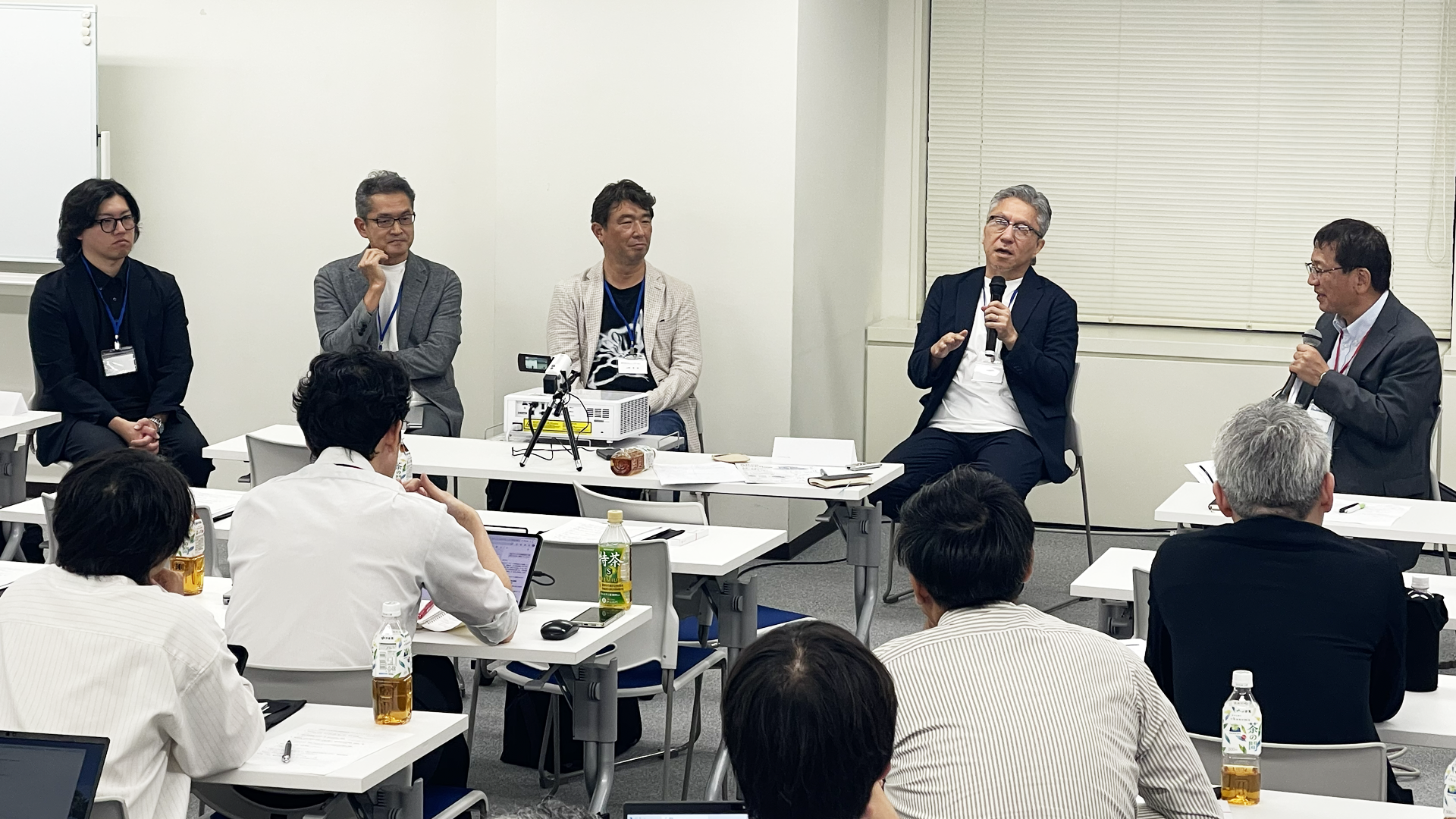
Panelists discussing the automation of drawing creation. From left to right: Shigeo Kobayashi of CAPA, Atsushi Miyaguchi of Core Concept Technology, Azuma Yamagiwa of BIM Architects, Shoichi Senda of Takenaka Corporation, and moderator Ryuta Ieiri, a construction IT journalist.
Shoichi Senda, Senior Chief Expert of the BIM Promotion Group at Takenaka Corporation’s Design Division, said, “We already have the BIM data. Instead of people having to go through the trouble of creating drawings from that data, shouldn’t the drawings themselves be simplified a bit more?” He pointed out that the drawings themselves need to be reviewed.
Azuma Yamagiwa, CEO of BIM Architects, said, “When creating drawings from BIM, we need to change the content, the way the drawings are presented, and even the order in which they are arranged, rather than continuing to use the same drawing methods as traditional paper drawings.”
AI is not merely an “automatic drawing machine.” It is beginning to take on the role of an “editor,” transforming BIM data into drawings that are easy for humans to understand.
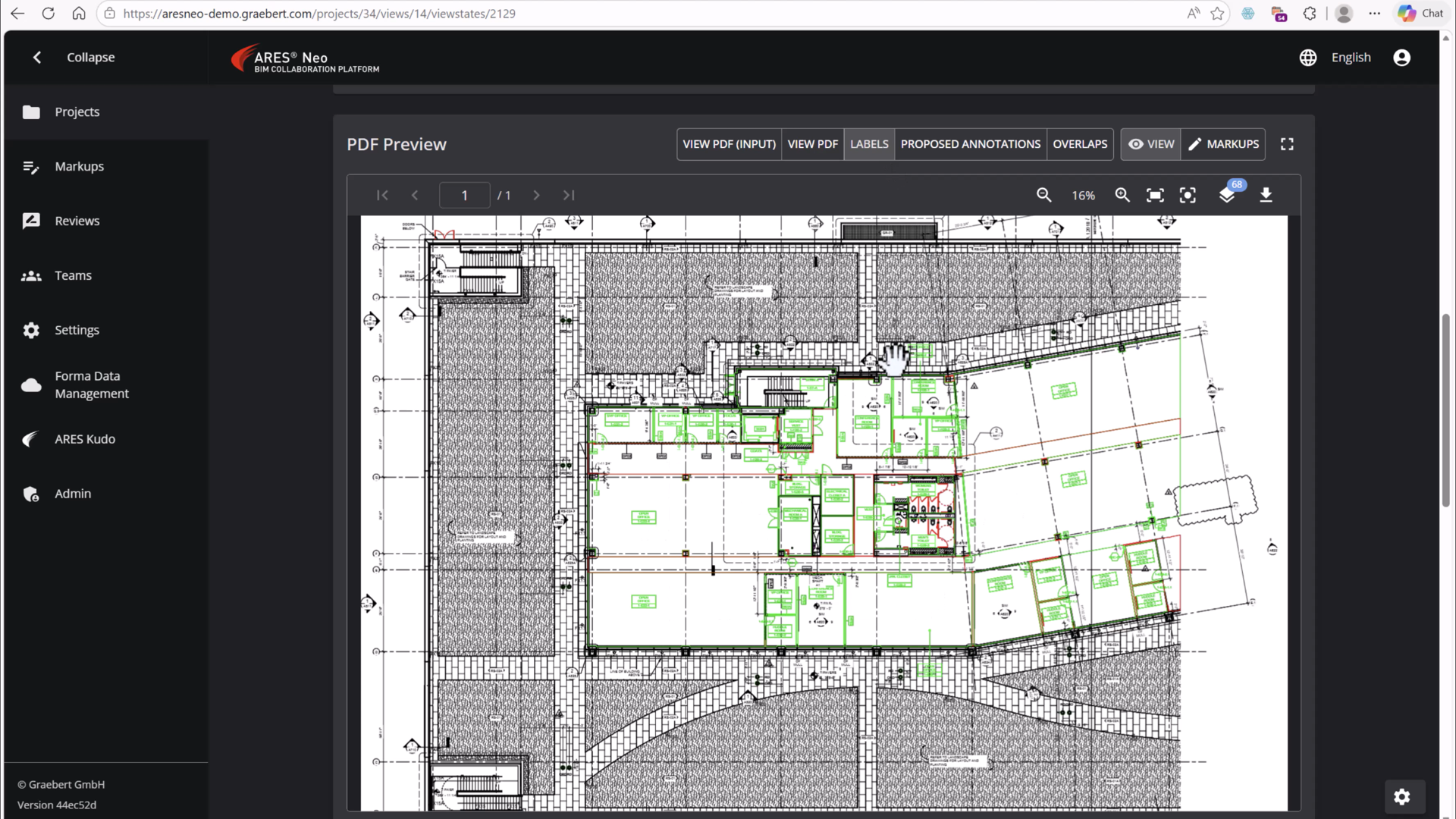
ARES Neo can use AI to modify drawings created from BIM models to make them easier to read.
AI Checks Drawing Modifications After BIM Changes
One reason why drawing creation doesn’t become easier even after implementing BIM is design changes. When design changes are made in the BIM model, the changes extend to floor plans, sections, dimensions, labels, and so on. As the number of drawings increases, the work of checking for any missed corrections also increases.
Many users still struggle with the double-layered process of creating a BIM model in 3D, then creating 2D drawings afterward, and then having to revise them again if changes are made.Therefore, ARES Neo aims to be a system that imports Revit views and drawings into the cloud, checks for consistency with the model and any changes, and inspects the drawings. It uses AI to check for things that were previously checked manually by humans, such as whether necessary labels are missing or whether there are any overlapping displays, and suggests corrections as needed.
The key point here is that the drawings aren’t just automatically generated once. The drawings are updated every time the model changes, automating even the “drawing maintenance process.”
Atsushi Miyaguchi, head of the Construction DX Department at Core Concept Technology, says, “As we entrust more tasks to AI, the roles required of humans will change. These will be the ability to articulate ‘what we want to create’ and the ability to check whether the resulting output is correct.”
AI checks a vast number of changes and lists suspicious areas as potential corrections. Humans then review the list and determine if the changes align with the design intent. The division of roles between AI and humans in the process of modifying drawings is likely to change.
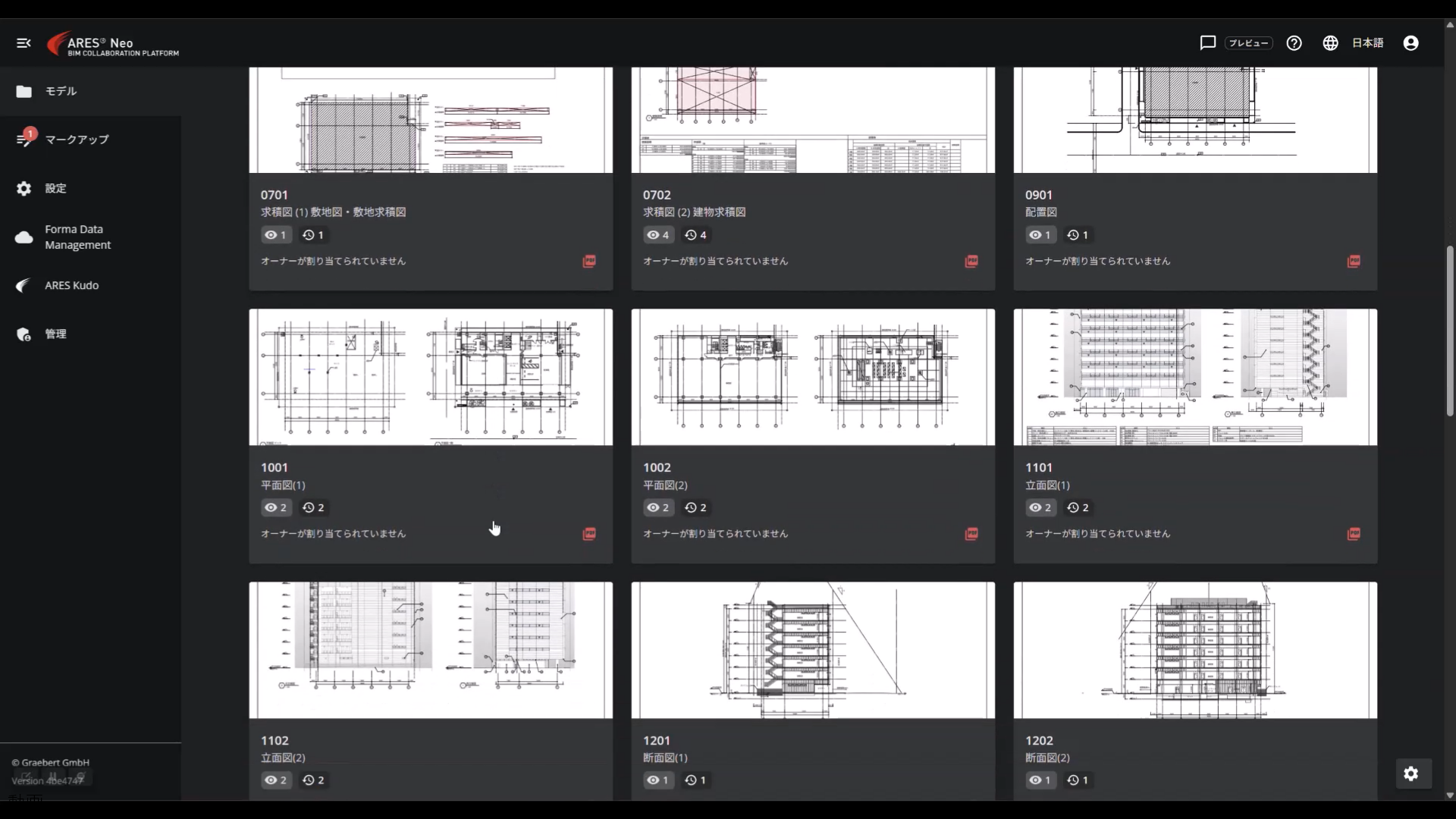
ARES Neo displays multiple views and drawings in a list, allowing a human to manually check for any suspicious areas.
ARES Neo Heads to Europe: Robert Gräbert at BIMWORLD Munich
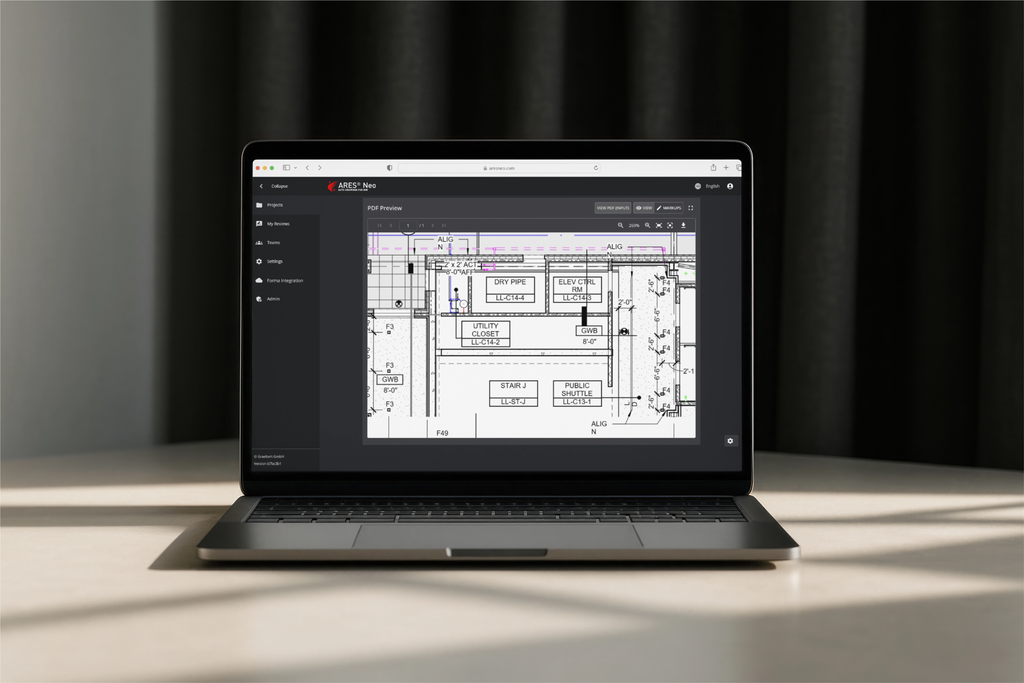
After its first introduction in Japan, ARES Neo will be presented to the European BIM community. Robert Gräbert, CTO of Graebert, will speak on the main stage at BIMWORLD Munich on November 24, 2026, at 5:35 pm. His talk, “ARES Neo – Auto-Drawings for BIM,” draws on real-world examples to look at where BIM documentation time goes (drawing creation, annotation and QA/QC can consume 20% to 40% of project time) and what happens when automation is applied at scale across projects with thousands of drawings.
Streamline Your Drawing Workflow by Moving it to the Cloud
Automating drawing creation presents another problem: processing large numbers of BIM models and drawings at once can occupy the designer’s computer for extended periods. ARES can also generate numerous drawings from BIM models on the desktop, but with large models, the computer could be unusable for 1–2 hours while processing.
Therefore, Graebert developed a system that runs the ARES Commander CAD engine itself on the cloud side and processes the data on the server. This allows tasks such as converting large numbers of DWG files to PDF, outputting drawings overnight, and creating large numbers of DWG files from BIM to be outsourced to the cloud, eliminating the need for people to wait in front of their computers during that time.
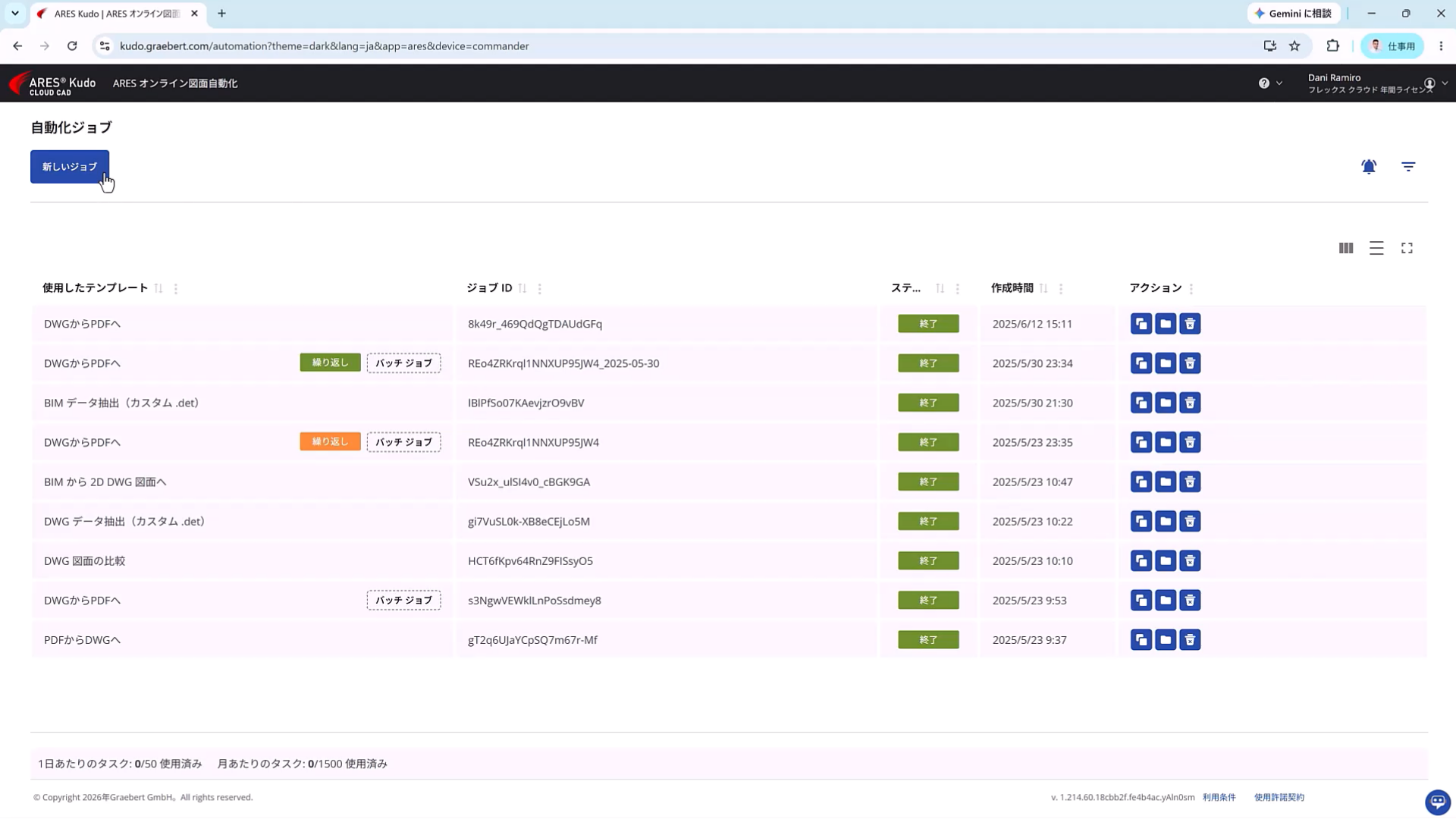
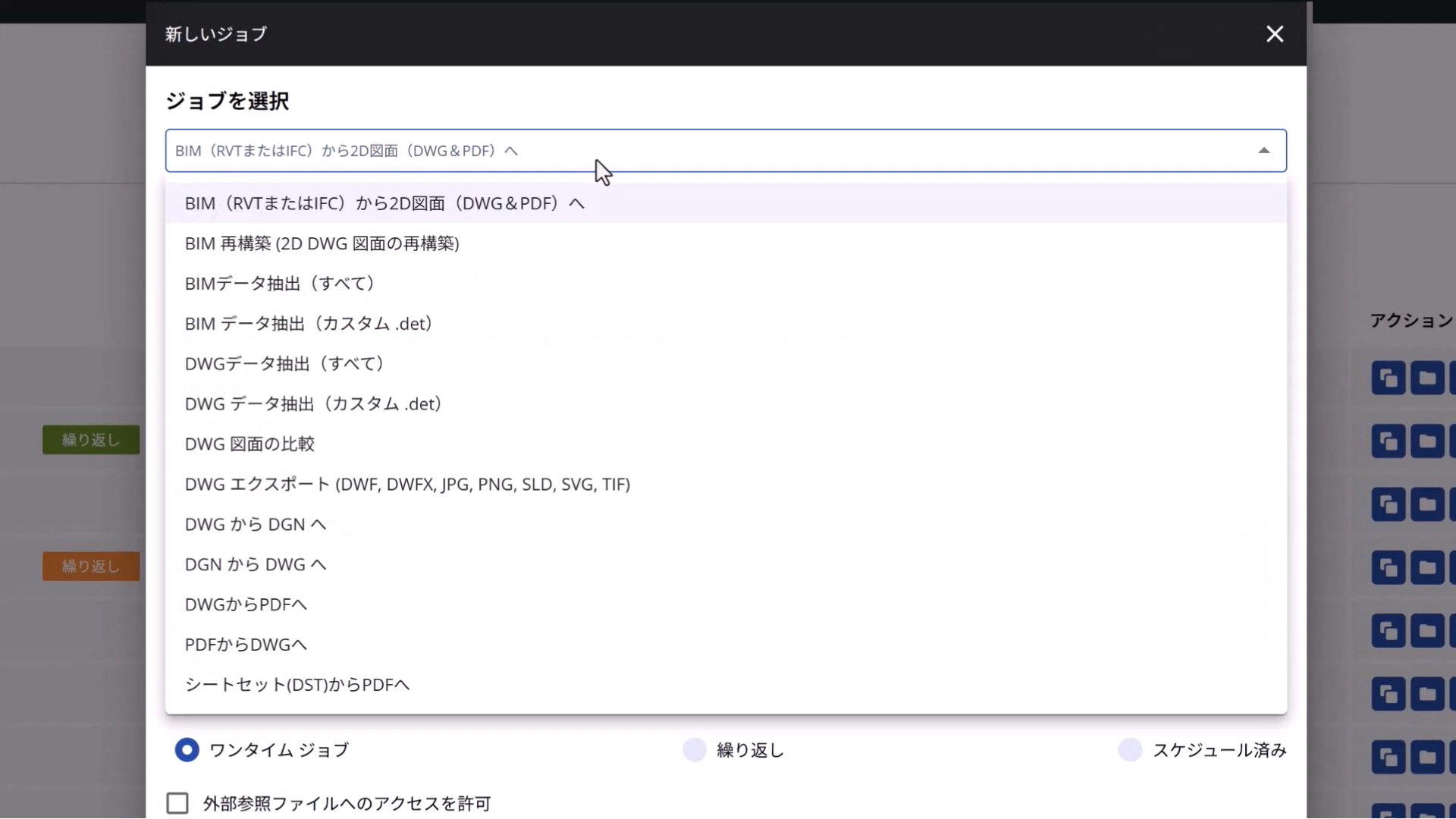
Screen for setting up and managing processing jobs using online automation.
A further significant change is the API-based functionality that allows other programs to call and use ARES on the cloud. CAD functions can now be called from external business systems and workflows to create drawings, further accelerating automation of tasks without human intervention.
Shigeo Kobayashi, head of the sales department at CAPA, a company that develops automated drawing processes, highlights the external integration capabilities of DWG-compatible CAD software, stating, “ARES Kudo, which runs on the cloud, allows sales, design, and field personnel to view drawings in a browser without needing to install dedicated tools. Furthermore, it’s easy to automate, use APIs, and customize, making it easier to propose to customers.”
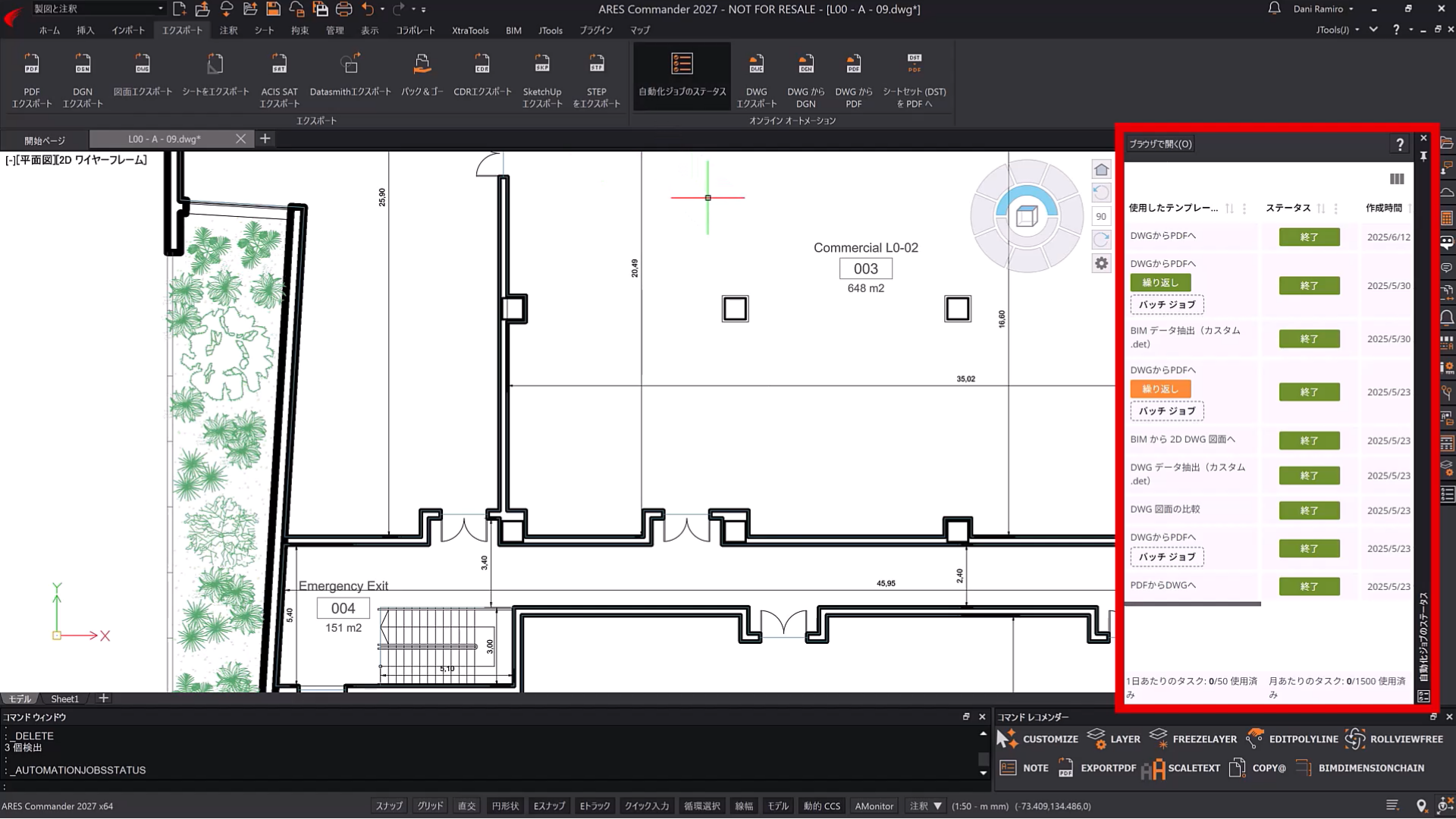
An operation screen combining CAD and online processing.
The next step is support for a connection method called MCP (Model Context Protocol), which allows generative AIs such as ChatGPT and Claude to call ARES functions and execute CAD operations and drawing processing.
If ARES is connected to the generative AI or AI agent via MCP, the processing conceived by the AI can be executed on the CAD side, dramatically increasing the degree of automation.
For example, it becomes possible to build a workflow that automatically executes a series of processes, such as acquiring the latest BIM model, checking for changes, creating drawings using ARES, converting them to PDF, and saving them to a designated location, all based on instructions given to the generative AI.

ARES Commander is improving its support for MCP, enabling it to call CAD functions from external generativeAI and perform drawing and drawing processing.
Furthermore, by calling ARES from workflow automation tools like n8n, it seems possible to utilize CAD not as an independent application, but as a subroutine responsible for drawing processing.
If generative AI and AI agents are the brains, then ARES will be the “hands and feet” that read and write DWG files. It’s clear to see that DWG-compatible CAD software, which designers have been using to create drawings manually, is undergoing a major transformation.
Achieving Safe Automation Through the Use of AI That Integrates Humans and Machines
At this point, it might seem as though AI could handle the majority of drawing creation. However, ARES software does not adopt the approach of leaving everything to AI.
While generative AI excels at making flexible decisions, it doesn’t produce the exact same answer to the same question every time. This characteristic requires careful consideration in tasks where reproducibility is essential, such as drawing blueprints.
Therefore, for processes that require the same result every time, such as file conversion and periodic output, we use conventional automation functions. On the other hand, we use AI for parts that require flexibility, such as adjusting the position of text.
Graebert will not allow AI to arbitrarily change long-established drawing standards, but will instead retain them as rule-based systems. ARES software defines this as automation that “does not rely solely on AI.” Even if the AI creates a revised proposal, it is not finalized as is; ultimately, a human reviews and approves the content.
The division of roles pointed out by Mr. Miyaguchi, where “humans check the work performed by AI,” is also consistent with this idea.
AI will be entrusted with time-consuming tasks that don’t require continuous human judgment, such as clicking, converting, searching, comparing, checking, and adjusting layouts. Meanwhile, humans will focus on making final decisions, such as what kind of building to design, what kind of drawings to convey to the other party, and whether to adopt the proposals presented by the AI.
In other words, this is a “human–machine integrated” approach to CAD use, where AI handles the miscellaneous and complex tasks, while humans make the final decisions and take responsibility. Graebert cited research by the British architectural design firm Foster + Partners, which showed that the human–machine integrated approach leads to greater productivity improvements.
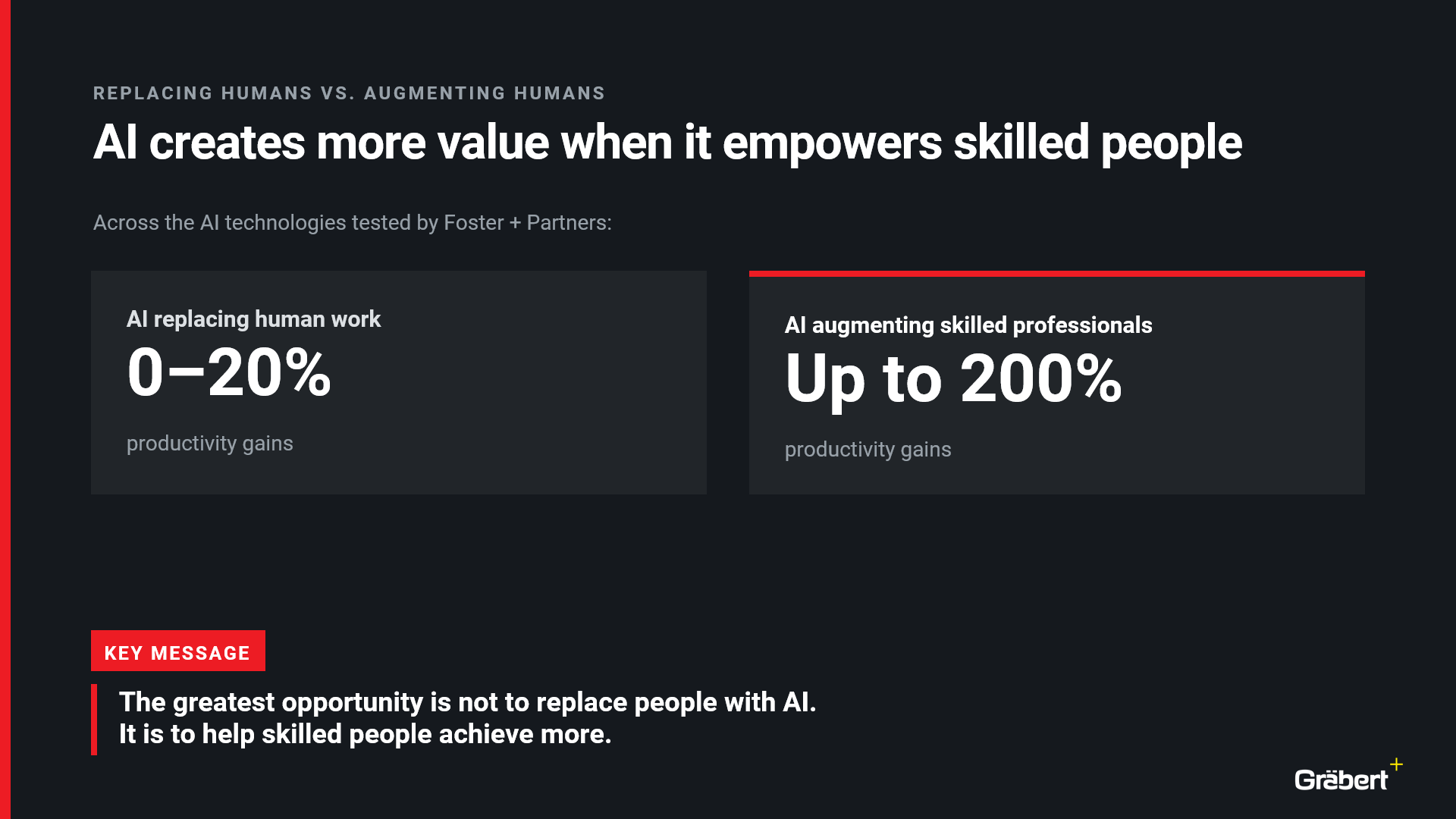
Graebert’s slides citing research by Foster + Partners show that while AI replacing human jobs results in a productivity increase of 0-20%, AI assisting skilled workers can increase productivity by up to 200%.
“The goal is not to replace humans with AI. The important thing is to make AI and automation something that everyone can trust and use in their daily work,” Desbordes explained.
From a tool for humans to create CAD drawings to a platform where humans and AI collaborate to complete drawings, the ARES series is bringing DWG-compatible CAD, which had long been considered a “mature product,” to a new level through AI, BIM, cloud, and APIs.
ARES Neo Next Stop: BIMWORLD Munich
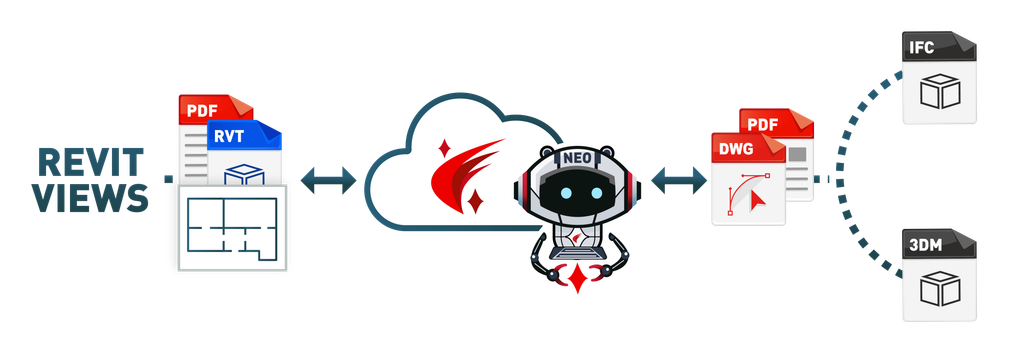
ARES Neo was introduced for the first time in Japan, and the next chance to see it is in Europe. Robert Gräbert, CTO of Graebert, will speak on the main stage (Congress Stage 1) at BIMWORLD Munich on November 24, 2026, at 5:35 pm.
Robert’s talk, “ARES Neo – Auto-Drawings for BIM,” starts from a familiar problem: from drawing creation and annotation to QA/QC, BIM documentation can consume 20% to 40% of project time, and each new model revision can mean up to two weeks of rechecking and validating drawings. Using real-world examples, he will show what happens when annotation and review are moved outside Revit and other BIM authoring tools and run at scale across projects with thousands of drawings. The session also covers where this approach works well, where real project conditions challenge automation, and what Graebert is improving next, including cross-view verification and the balance between company-wide standards and project-specific exceptions.